Player overlays
Player ESP
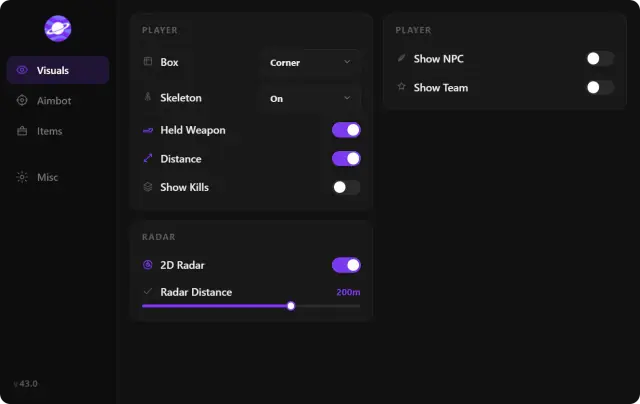
Choose full or corner boxes, skeletons, distance labels, snaplines and colors for visible or obscured players. Team and NPC controls help separate the groups you want to display.
Explore our Fortnite cheats for PC with adjustable aimbot, player ESP, radar and item filters. Review the requirements before comparing access plans.

Fortnite
PC game
Windows 10 / 11
Supported Windows versions
31
Days of monthly access
Cloud DMA
Required
Features
Player boxes, skeletons and distance labels put information beside each player. The radar keeps relative positions in a separate view.
Read the ESP and wallhack guide to see how those labels differ from a radar view. Compare aim, ESP and radar in the guide library if you’re deciding which settings matter to you.
Player ESP
Choose full or corner boxes, skeletons, distance labels, snaplines and colors for visible or obscured players. Team and NPC controls help separate the groups you want to display.
Aimbot
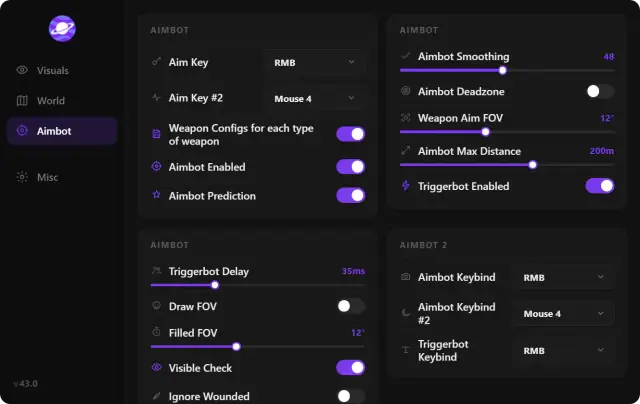
Set the target region, field of view, smoothing, deadzone and activation keys per weapon type. Triggerbot has separate settings for hitbox, key and delay.
Radar and loot
Adjust radar range, orientation and team markers. Item ESP can display rarity, quantity and distance and filter the categories you want to see.
PC requirements
Use Windows 10 or 11, at least 8 GB of RAM, a dedicated GPU and Cloud DMA.
Store
Find the Fortnite product or compare tools for hardware identifiers, local cosmetics and appeal preparation.
Compare 31-day and lifetime access to Fortnite Cheats
Compare 31-day and lifetime access to Fortnite Cheats. Review player ESP, radar, item filters, aim controls and PC requirements before ordering.
From $35 / month
Hardware ID changes and trace cleanup
Review the hardware identifiers, included trace cleaner, Windows prerequisites and license terms for HWID Spoofer.
From $50 / month
Templates and evidence for account appeals
Organize ownership records and a timeline for an account appeal. See what UGC can help prepare, its Windows prerequisites and access terms.
From $35 / month
Local previews for outfits, finishes and knives
See which kinds of cosmetics the client previews locally, what you need to run it, and how the two plans differ in duration.
From $35 / month
Why us
Filter item labels by rarity and distance. Aimbot controls are grouped by weapon type, with separate activation keys and smoothing.
Player overlays
Choose full or corner boxes, skeletons, distance labels, snaplines and colors for visible or obscured players. Team and NPC controls help separate the groups you want to display.
Aim controls by weapon type
Set the target region, field of view, smoothing, deadzone and activation keys per weapon type. Triggerbot has separate settings for hitbox, key and delay.
Radar and item filters
Adjust radar range, orientation and team markers. Item ESP can display rarity, quantity and distance and filter the categories you want to see.
Supported PC setup
Use Windows 10 or 11, at least 8 GB of RAM, a dedicated GPU and Cloud DMA.
PC
Fortnite
Fortnite on PC. Check the current game build.
31
Monthly or lifetime
Choose $35 for 31 days or $150 for lifetime access. Check the lifetime terms and any hardware costs before paying.
4
Choose the right tool
Licenses are product-specific. Match your purchase to the toolkit or utility you intend to use, and check its own setup requirements.
Setup guide
Windows 10 or 11. Cloud DMA required.
Check your setup
Choose your plan
Use the current instructions
How it works
Check Windows, your graphics card and Cloud DMA before ordering.
4 steps
Check your setup
Windows 10 or 11. Cloud DMA required.
Choose your plan
Choose 31 days or lifetime access and keep your order details.
Use the current instructions
Follow the setup guide and confirm compatibility before you launch.
Keep a useful configuration
Save your settings and presets. Recheck compatibility after a game update.
Blog
Read guides to Fortnite aim controls, player overlays, loot and radar, PC requirements and access terms.
How the controller setting, third-party aimbot and triggerbot differ, and which controls appear in the Fortnite product.
Learn what player boxes, skeletons and labels show, and how those overlays differ from item ESP and radar.
Compare item filters and player radar by the information each display provides.
FAQ
Browse the full FAQ for more topics.